Shake It Like an Instant Photo: A Practical Guide to Instagram Frames
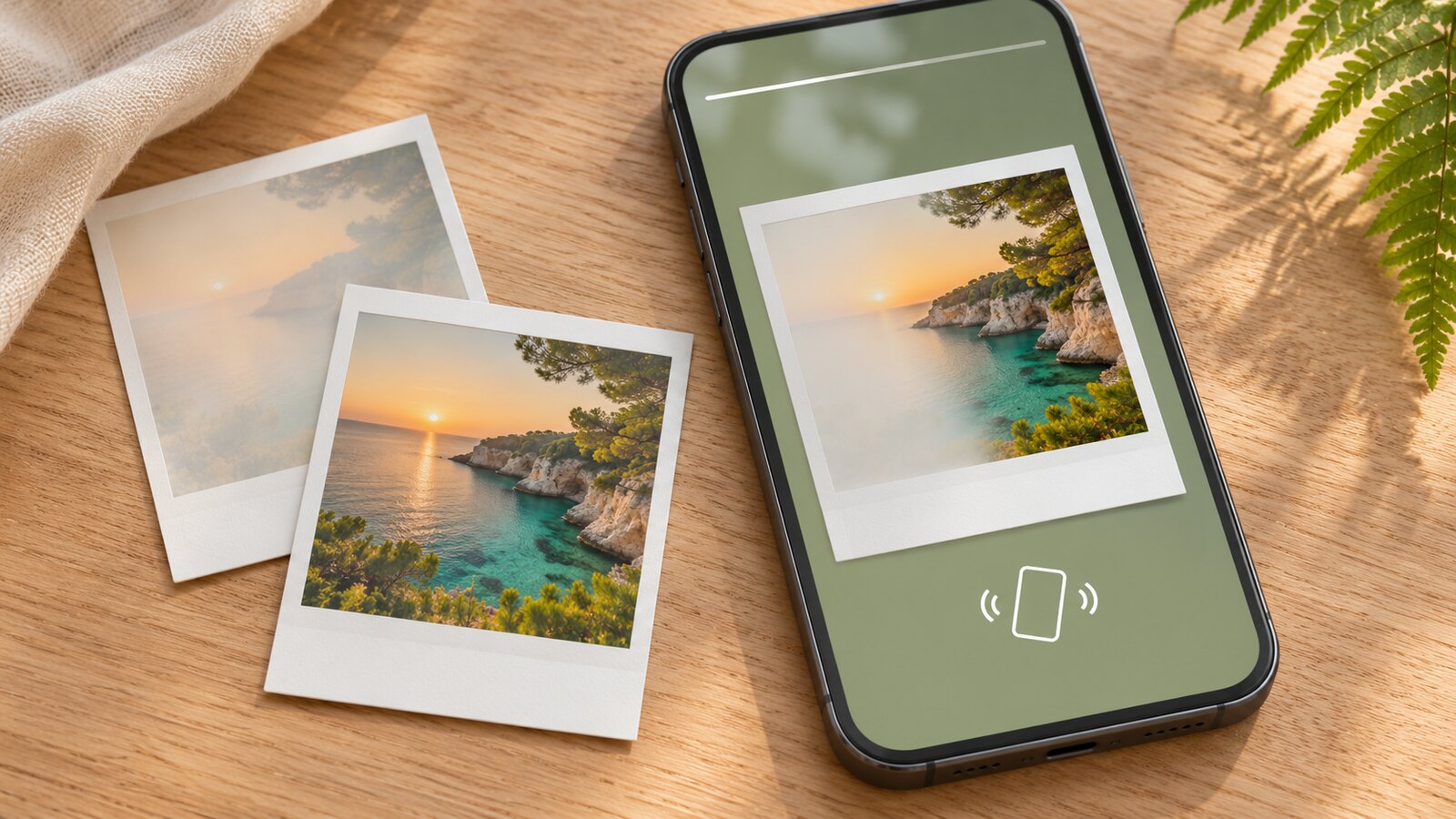
TL;DR: Frames is an Instagram Stories sticker that turns any photo from your gallery into a virtual instant print, complete with a white border, the date and time the photo was taken, and an optional handwritten-style caption. When you share it, viewers first see a greyed-out, “undeveloped” frame. To reveal the picture, they shake their phone or tap the Shake to reveal button, and the image fades in like a developing instant photo, along with your caption. To create one: start a Story, tap the sticker icon, choose Frames, pick one photo, add a caption if you like, then share. Frames launched in April 2024 as a Coachella activation and rolled out widely in May 2024, alongside the Reveal, Cutouts and Add Yours Music stickers. Unlike the Reveal sticker, Frames doesn’t require viewers to send you a message: anyone who can see your Story can unveil the photo.
Instant cameras were never really about image quality. Anyone who has held one knows the appeal lies in the wait: the soft whirr, the blank grey square, the ritual of watching a face slowly emerge. Fifteen seconds of suspense, give or take, for a slightly washed-out photo you’d somehow treasure for decades.
Instagram bottled that feeling and put it in a sticker.
Frames is one of those features that looks like a gimmick at first glance and then turns out to be surprisingly effective. It adds a tiny moment of anticipation to a Story, and anticipation is exactly what keeps thumbs from swiping away. At Dumpor, we watch a lot of public Stories, and Frames has quietly become a favourite for teasers, throwbacks and playful reveals. Here’s how it works, from creating one to what your viewers actually see.
Where Frames Came From
The sticker made its debut in April 2024, tied to Coachella and developed in collaboration with the K-pop group LE SSERAFIM. The idea was simple: turn photos into instant-print-style images that need to be “developed” before anyone can see them.
A few weeks later, on May 3, 2024, Instagram rolled Frames out more widely as part of a batch of four new Story stickers:
- Frames, the instant-print sticker covered here.
- Reveal, which hides a whole Story until the viewer sends you a direct message.
- Cutouts, which turns objects in your photos or videos into reusable custom stickers.
- Add Yours Music, which invites followers to reply with a song of their own.
Of those four, Frames is the most purely playful. It doesn’t gather data or push people into your DMs. It just makes looking at a photo a bit more fun.
What a Frames Sticker Looks Like
Before the reveal, a Frames sticker appears as a classic instant print with a thick white border and a greyed-out, foggy centre. A small prompt at the bottom of the screen invites viewers to shake their phone.
After the reveal, the photo gradually fades in, just like a real instant print developing. The frame also shows:
- A date and timestamp, added automatically, showing when the photo was originally taken.
- Your caption, if you added one, written along the bottom border and revealed at the same time as the image.
The frame can be moved, resized and rotated on your Story like any other sticker. Many creators tilt it slightly or place it over a textured background to make it feel more like a real print lying on a table.
How to Create a Frames Sticker
The whole process takes about thirty seconds. These steps work the same on iPhone and Android.
-
Open Instagram and start a new Story. You can use a photo, a video or a plain colour background behind the frame.
-
Tap the sticker icon at the top of the screen (the square smiley face).
-
Select Frames, or type “frames” into the sticker search bar.
-
Your gallery opens. Choose one photo to place inside the frame.
-
Optionally, tap the caption area and type a short message. Keep it brief, since the border has limited space.
-
Place the frame where you want it: drag to move, pinch to resize, twist with two fingers to rotate.
-
Share your Story to Your story or Close Friends.
Before posting, it’s worth previewing your Story to make sure the frame isn’t covering anything important on the background and that the caption reads well.
A note on the timestamp: because Frames uses the date the photo was actually taken, an old picture will show its original date. That’s lovely for throwbacks. It’s less lovely if you were hoping to pass off last summer’s beach photo as today’s, so bear that in mind.
How Viewers Reveal the Hidden Photo
Here’s what happens on the other side of the screen.
-
A viewer opens your Story and sees the undeveloped frame with a “Shake to reveal” prompt.
-
They shake their phone, gently is enough, or tap the Shake to reveal button if shaking isn’t convenient.
-
The image develops inside the frame over a second or two, and the caption appears.
The tap option matters more than it might seem. Not everyone can shake their phone easily: people on a crowded train, people holding a coffee in the other hand and, importantly, people with limited mobility. The button ensures the content stays accessible to everyone.
Unlike some interactive stickers, revealing a frame isn’t a private action you get notified about. Viewers simply see the photo. There’s no list of “who shook,” and nothing is sent to your inbox.
Frames vs Reveal: Not the Same Thing
The two stickers arrived together and both hide content, so they’re often confused. They work very differently, though.
|
Feature |
Frames |
Reveal |
|---|
|
What’s hidden |
One photo inside an instant-print frame |
The entire Story, blurred |
|
How viewers unlock it |
Shake the phone or tap “Shake to reveal” |
Send you a direct message |
|
Does it start a conversation? |
No |
Yes, every reveal is a DM |
|
Who can unlock it |
Anyone who can see your Story |
Anyone who messages you |
|
Extra details shown |
Date, time and optional caption |
A hint you write to tease the content |
|
Content type |
A single photo from your gallery |
The full Story frame, photo or video |
|
Best for |
Playful teasers, throwbacks, aesthetic Stories |
Building DM engagement, exclusive previews |
In short: Frames adds suspense, Reveal adds conversation. If your goal is more direct messages, use Reveal. If you just want people to pause on a Story for an extra second, Frames is the gentler choice.
Creative Ways to Use Frames
We’ve seen Frames used in some genuinely clever ways across public accounts. Here are the ideas that tend to work best.
For creators and personal accounts
- Throwback Thursdays. Old photos look perfect in an instant-print frame, and the automatic date adds a sweet touch of nostalgia.
- Travel memories. Frame a single standout shot from a trip and caption it with the place name.
- Birthday tributes. A framed photo with a short caption feels more personal than a plain repost.
- Mini photo albums. Post a sequence of framed photos across several Story slides, each with its own caption, like flicking through a stack of prints.
For brands and businesses
- Product teasers. Frame a close-up of an upcoming product, so curious followers have to shake to see it.
- Behind the scenes. A framed snapshot from a photo shoot or the kitchen gives a casual, authentic feel.
- Event recaps. After a launch or pop-up, share framed photos of guests (with permission), captioned with the date.
- Contests. “Shake to see this week’s winner” turns an announcement into a small moment of suspense.
The Frames sticker also pairs well with other stickers. Put a countdown or a link on the next Story slide, and you’ve turned a fun reveal into a small campaign. If you want to see how others structure these sequences, the Dumpor Instagram Story Viewer lets you watch public Stories anonymously and study how brands combine Frames with other interactive elements, without appearing in their viewer list. Keep in mind that interactive features like shaking or tapping to reveal are designed for the Instagram app itself.
Who Can See Your Framed Photo
A Frames sticker follows the same visibility rules as the Story it sits on. Nothing about the sticker changes your audience. In practice, that means:
- Public account: anyone who opens your Story can develop the photo.
- Private account: only your approved followers can see the Story and reveal the frame.
- Close Friends: only people on your Close Friends list see it, which makes Frames a nice way to share a personal snapshot with a smaller circle.
- Hidden from specific people: if you’ve hidden your Story from certain accounts, they won’t see the framed photo either.
The “undeveloped” effect is a visual game, not a privacy setting. It hides the photo for a moment, not from a particular person, so don’t use Frames for anything you wouldn’t post openly to the same audience.
Keeping Frames Beyond 24 Hours
Like any Story, a Frames post disappears after 24 hours unless you save it. Adding it to a Highlight keeps it on your profile indefinitely, and viewers can still develop the photo each time they open it.
Some accounts build entire Highlights around framed photos: a “Memories” collection, a “Behind the scenes” album, a year-in-review series. The instant-print look makes these Highlights feel cohesive, almost like a digital scrapbook pinned to the profile. For inspiration, the Dumpor Instagram Highlights Viewer lets you browse any public account’s Highlights anonymously and see how creators organize their saved Stories.
Troubleshooting: When Frames Doesn’t Work
Most problems with Frames have simple causes.
- The sticker isn’t in the tray. Update the Instagram app and restart your phone. Features sometimes roll out gradually by region, so it may take a little longer to appear for some accounts.
- Only one photo can be added. Each Frames sticker holds a single image. For several photos, use several frames or several Story slides.
- Shaking does nothing. Some phones limit motion detection, especially with certain accessibility or battery-saving settings. Tap the Shake to reveal button instead.
- The date looks wrong. The timestamp comes from the photo’s original metadata. Screenshots, edited images or photos downloaded from messaging apps may carry the date they were saved, not the date they were taken.
- The frame covers the background. Resize it with a pinch, or choose a simpler background that lets the frame stand out.
- You can’t add video. Frames is designed for still photos. To hide a video, consider the Reveal sticker instead.
A Few Design Tips
Small choices make a big difference to how Frames looks on screen:
- Use a contrasting background. A white frame on a white background disappears. Try a dark colour, a wood texture or a blurred version of the same photo.
- Keep captions short. Two or three words in the frame’s border read better than a full sentence.
- Tilt it slightly. A rotation of a few degrees makes the print feel more physical and less like a template.
- Give it room. Avoid stacking text, GIFs and other stickers over the frame. Let the reveal be the moment.
- Add a nudge. A short text line like “Shake me” or an arrow pointing to the frame helps viewers who’ve never seen the sticker before.
Why Small Moments of Suspense Work
It’s easy to dismiss Frames as a novelty. Yet the psychology is sound. Stories are consumed at speed, and any element that asks for a tiny action (a shake, a tap) gives viewers a reason to pause rather than swipe. That pause is where attention, recall and engagement come from.
Used occasionally, Frames feels delightful. Used on every Story, it becomes a hurdle. As with most interactive stickers, the trick is restraint: save it for photos that genuinely deserve a reveal.
Before you plan your next Frames-based teaser, take a look at how your profile presents itself to new visitors who arrive after watching your Stories. The Dumpor Instagram Profile Viewer lets you see any public profile, including your own, exactly as an outsider would, without logging in. Type a username into the search bar at the top of the page and take a look.
FAQ
Frequently Asked Questions
What is the Frames sticker on Instagram?+
Frames is an Instagram Stories sticker that turns a photo from your gallery into a virtual instant print. The photo is hidden behind a grey, undeveloped surface until viewers shake their phone or tap the Shake to reveal button. The frame automatically shows the date and time the photo was taken, and you can add a short caption that appears along the border.
How do I use the Frames sticker?+
Start a new Story, tap the sticker icon at the top of the screen and select Frames. Your gallery will open, so choose one photo. Add a caption if you want, then move, resize or rotate the frame on your Story. Share it to Your story or Close Friends, and viewers will be able to shake their phone to develop the photo.
How does “Shake to reveal” work on Instagram?+
When a viewer opens a Story with a Frames sticker, they see an undeveloped instant print. Shaking the phone triggers the reveal animation, and the photo fades in along with any caption, much like a real instant photo developing. Viewers who can’t or don’t want to shake their phone can tap the Shake to reveal button instead.
Do I need to shake my phone to see a Frames photo?+
No. Instagram includes a Shake to reveal button that develops the photo with a single tap. This is useful in situations where shaking isn’t practical and makes the feature accessible to people with limited mobility. The result is exactly the same either way.
Can I see who revealed my Frames sticker?+
No. Instagram doesn’t provide a separate list of people who shook or tapped to reveal a Frames photo. You can still see who viewed your Story in the usual viewer list, but revealing the frame isn’t tracked as a distinct interaction or sent to you as a notification.
What is the difference between the Frames and Reveal stickers?+
Frames hides a single photo inside an instant-print frame, and anyone who sees your Story can reveal it by shaking or tapping. Reveal blurs your entire Story, and viewers can only see it by sending you a direct message. Frames is designed for fun and suspense, while Reveal is designed to start conversations in your inbox.
Can I add more than one photo to a Frames sticker?+
Each Frames sticker holds one photo. If you want to share several framed photos, post them across multiple Story slides, each with its own Frames sticker. This works nicely as a mini photo album that viewers flick through one print at a time.
Can I use Frames with videos?+
Frames is designed for still photos from your gallery. If you want to hide a video in your Story, the Reveal sticker is the better option, since it blurs the entire Story until a viewer sends you a direct message.
Why does my Frames sticker show the wrong date?+
The date and time on a Frames sticker come from the photo’s original metadata. If the image is a screenshot, an edited copy or a file saved from a messaging app, the timestamp may reflect when that file was created rather than when the photo was originally taken.
Why can’t I find the Frames sticker?+
Make sure your Instagram app is updated to the latest version, then restart your phone and check the sticker tray again, or type “frames” into the sticker search bar. New stickers sometimes reach accounts gradually by region, so if it’s still missing, it may simply need a little more time to appear.

 Telegram bot
|
TikTok Viewer